OpenCV Basics

Welcome to OpenCV with Python Series for computer vision. We will explore OpenCV from basics to advanced, this article is created along my learning process about OpenCV. The series will be different than from rest of my writing style (formal writing) and the article update will try to improve the article gradually. Without any further intro, let me introduce OpenCV.
import cv2
img = cv2.imread('cat.jpeg')
print("Image is of type: ",type(img))
Image is of type: <class 'numpy.ndarray'>
This show that after reading an image OpenCV converts to numpy arrary by default. Which makes much easy to work with.
Displaying the image can be done in the notebook using matplotlib but if we want to display full image we can use opencv imshow method.
cv2.imshow('cat',img)
cv2.waitKey(0)
cv2.destroyAllWindows()
In the following code I will be using matplotlib.
import matplotlib.pyplot as plt
plt.imshow(img)

Let's view the shape of this numpy array(image)
print("Image shape: ",img.shape)
Image shape: (1280, 900, 3)
We have a 1280*900 pixels in 3 channels(Red, Blue and Green) each. That is if we were to calculate how many pixels make up this image then the anwser is 1280 X 900 X 3 = 3456000 pixels.
OpenCV provides methods to save the numpy array (image) into any format we specify as following
cv2.imwrite('cat.png',img)
Understanding channels
Till now we just explored how to read and write image, and view them. Now we will be looking into what channels are.
Understanding Black and white images: These are the images with pixels that consists of either black or white colors, more specifically light intensity 0 for black and 255 for white.
Understanding Gray Scale images: Whereas, they are the images with pixels storing intensities anywhere between 0 to 255. Where values near to 255 are lighter and values near to 0 are darker under different shades of grey.
Understanding Channels: Channels are nothing other than color. If we say Red channel then we mean Red color, and saying a pixel in Red channel has intensity 0 will mean that there is No-Red color(shade) and saying intensity of 255 will mean we have darkest red.
Interestingly, we can use combination of 3 colors to generate other colors.
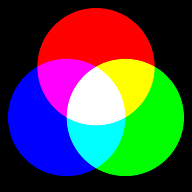
By using combinations of Red, Blue and Green we get variety of colors.
We can read images in Grey Channel or in RGB.
Note: OpenCV reads image in BGR(Blue,Green,Red) order not RGB order
Reading images in Gray Scale in OpenCV
grey_img = cv2.imread("./cat.png",cv2.IMREAD_GRAYSCALE)
plt.imshow(grey_img)
Or we can even convert the read image into any other channels as
converted_grey = cv2.cvtColor(img,cv2.COLOR_BGR2GRAY)
plt.imshow(converted_grey)
To access the individual channel from the BGR image, we can proceed by:
b,g,r = img[:,:,0],img[:,:,1],img[:,:,2]
concated = cv2.hconcat([b,g,r])
plt.imshow(concated)
In the next article we will explore some augmentation methods available in OpenCV.


